You have a clear picture of your app in your head — users, projects, tasks, how they all connect. Translating that picture into database tables, foreign keys, and data types? That's where things slow down.
AI schema generators close that gap - the AI code generation market reached $4.91 billion in 2024 and continues growing rapidly. You describe your data in plain English, and the tool outputs a working database structure in seconds. This guide walks through how the process works, which databases you can target, and how to go from generated schema to production-ready backend.
What is an AI schema generator?
An AI schema generator takes a plain-English description of your application and turns it into a working database structure — tables, fields, data types, and relationships — without you writing any SQL. You describe what your app stores ("users, projects, and tasks where users belong to teams"), and the AI figures out how to organize that data.
The word "schema" here refers to the blueprint of your database. It defines what tables exist, what columns each table has, and how tables connect to each other. Traditionally, creating a schema meant either writing SQL by hand or dragging boxes around in a visual tool. AI schema generators skip both steps.
- Schema: The structural definition of your database — tables, columns, data types, and relationships between tables.
- AI generation: Converting natural language into database definitions automatically.
- Output: Depending on the tool, you get SQL statements, visual diagrams, or a live database ready to use.
In a nutshell: You think in terms of your application ("I have users who create posts"), the AI thinks in terms of database structure (a users table, a posts table, a foreign key connecting them), and the generator bridges that gap.
How does AI schema generation work?
The process is straightforward. You write a description, the AI extracts entities and relationships, and it outputs a structured schema. What makes this useful is that you don't have to think like a database administrator — you think like someone building an app.
Say you type: "I'm building a project management tool with users, teams, projects, and tasks. Users belong to teams. Projects belong to teams. Tasks belong to projects and are assigned to users."
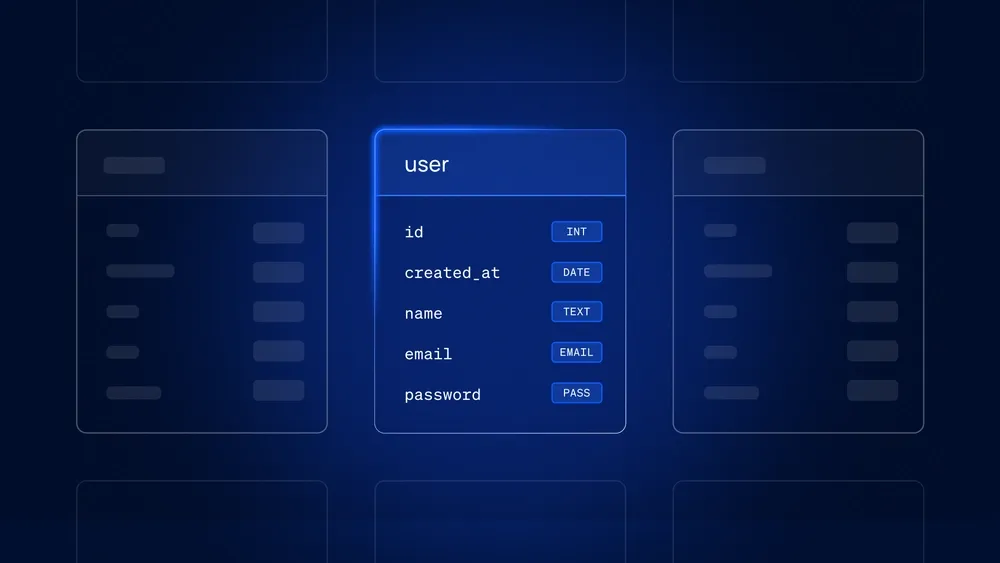
From that single sentence, the AI identifies four entities. It infers that users has a foreign key to teams, that projects also connects to teams, and that tasks connects to both projects and users. Then it generates tables with appropriate fields: users gets id, name, email, and team_id. tasks gets id, title, status, project_id, and assigned_user_id.
The quality of your output depends on how specific your prompt is. "E-commerce app" gives the AI less to work with than "e-commerce app with customers, products, orders, and order line items where customers can have multiple shipping addresses."
What databases does an AI schema generator support?
Different projects call for different database types. Most AI schema generators can target multiple options, so you pick what fits your use case.
Managed Postgres
Postgres is the default choice for production backends, with 16.85% market share making it the second most used open source database. It handles complex queries well, enforces data integrity through constraints, and scales to serious workloads. Xano's no-code database runs on managed Postgres under the hood, so your AI-generated schema lands on a production-grade engine from day one. When you generate a schema targeting Postgres, you get tables with proper foreign keys, indexes, and constraints that are ready for real traffic.
SQL databases
Beyond Postgres, you might target MySQL or SQLite. MySQL remains common for web applications. SQLite works well for local development or embedded scenarios. The generated schema structure is similar across all of them — tables, columns, relationships — with minor syntax differences.
NoSQL databases
For applications with flexible or unstructured data, some generators output MongoDB collections or document-based schemas. This approach fits when your data shape varies between records or when you're working with deeply nested, hierarchical information.
How do I generate a database schema with AI?
Here's the typical workflow. Specific interfaces vary between tools, but the core steps stay consistent.
1. Describe your data requirements in plain English
Start by writing out what your application stores and how those things relate. Be specific about entities, relationships, and any constraints that matter.
Instead of "social media app," try: "Social media app where users create posts. Posts can have comments. Users can follow other users. Each post has a timestamp and optional image URL."
Mention if certain fields are required, if you expect high volumes of a particular record type, or if there are uniqueness constraints (like email addresses that can't repeat).
2. Let AI generate your initial schema
After you submit your prompt, the AI generator produces tables, fields, and relationships. This typically happens in seconds. You'll see table names, column definitions with data types, and foreign key connections reflecting the relationships you described.
Don't expect perfection on the first pass. The AI makes reasonable assumptions based on common patterns, but it doesn't know your specific business rules yet.
3. Refine tables, fields, and relationships visually
This is where you take ownership. Review what the AI generated and adjust. Maybe you want to rename a field, change a data type from varchar to text, or add an index on a column you'll query frequently.
Many platforms support visual development — clicking to edit field properties, dragging to create relationships — rather than writing ALTER TABLE statements. This makes iteration fast even if you're not comfortable with SQL.
4. Export or deploy your schema instantly
Once you're satisfied, you can deploy directly to a live database, export as SQL for use elsewhere, or connect the schema to your backend platform. With Xano, the schema you generate becomes immediately usable — you can start building APIs and logic on top of it without additional setup or infrastructure work.
Why developers use AI schema generators
The appeal varies depending on who you are and what you're trying to accomplish.
For backend engineers
You already know how to design schemas. That doesn't mean you want to spend time on boilerplate. AI schema generation handles the repetitive parts — developers save 30 to 75% of their time on coding and documentation tasks — creating standard tables, setting up common patterns like user authentication or content management, so you can focus on the logic that actually differentiates your application.
It's also useful for prototyping. Instead of spending an hour on initial schema design, you spend two minutes describing what you want, then refine from there.
For technical founders and product teams
You have ideas and domain expertise, but you might not have a dedicated database engineer. AI schema generation lets you move from concept to working data layer without waiting on engineering resources or learning SQL syntax from scratch.
This is especially valuable early on when you're iterating quickly and don't want database design to become a bottleneck.
For no-code and low-code builders
If you're building with tools like Bubble, WeWeb, or Bolt, you often still want a proper backend with a real database. AI schema generation bridges that gap — you describe your data, get a production-ready schema, and connect it to your frontend through APIs.
- Speed: Concept to schema in seconds instead of hours.
- Accuracy: AI suggests appropriate field types and relationships based on common patterns.
- Iteration: Regenerate or adjust quickly as requirements evolve.
Popular use cases for AI-generated schemas
What are people actually building with this approach? Here are the patterns that come up most often.
AI agents and intelligent workflows
Agents require persistent memory — conversation history, user context, orchestration state. AI schema generation makes it straightforward to set up tables that store this information, with proper relationships between sessions, messages, and user profiles. Xano's agent-ready architecture is designed specifically for this kind of AI agents and intelligent workflows.
Web and mobile applications
The classics: user accounts, content management, e-commerce catalogs, booking systems. These follow well-established patterns that AI handles particularly well because there's extensive training data on common application structures.
MVPs and rapid prototypes
When you're validating an idea, you want to move fast. AI schema generation gets a working data layer in place quickly so you can test with real users before committing to a final architecture.
Legacy system modernization
If you're migrating from an older system, you can describe your existing data structures and have AI generate a modern schema that maps to them. This gives you a starting point for migration planning without manually recreating everything.
How to build APIs and logic on your AI schema
Generating a schema is the first step. The real value comes from what you build on top of it.
Once your tables exist, you typically want to expose them through APIs so frontends and other services can interact with your data using tools like the Metadata API. You also want to add business logic — validation rules, transformations, workflows that trigger when data changes.
- API generation: Create endpoints for standard operations (create, read, update, delete) on your tables.
- Business logic: Add validation, computed fields, and workflows that run when records change.
- Frontend connection: Link your schema-powered backend to any frontend, whether that's a custom React app or a no-code builder.
With Xano, these pieces come together in one place. You generate your schema, build APIs on top of it, add logic visually or with code, and deploy — all without stitching together separate tools or managing infrastructure yourself.
Security and compliance for AI-generated schemas
Using AI to generate database structures raises reasonable questions about security. Here's what to look for when choosing a platform.
- Data isolation: Each workspace runs in its own container with separate credentials, so one project can't accidentally access another's data.
- Encryption: Data stays encrypted both in transit (moving between services) and at rest (stored on disk).
- Compliance: For regulated industries, look for platforms that support standards like GDPR, SOC 2, and HIPAA.
The AI itself typically doesn't store your schema descriptions or generated output beyond what's needed to produce results. You'll want to verify this with whatever tool you choose, especially if you're working with sensitive data models.
Build smarter backends with AI schema generation
AI schema generation removes one of the traditional friction points in backend development. You describe what you want, get a working structure, and iterate from there.
The next step is trying it yourself. Xano's database generator lets you describe your application and get a deployable schema in seconds — along with the APIs, logic, and infrastructure to build a complete backend.
FAQs about AI schema generators
Can you use an AI schema generator for production databases?
Yes. Many AI schema generators produce output that's ready for production, especially when paired with a managed database platform that handles security, backups, and scaling. The key is reviewing and refining the generated schema before deploying, just as you would with any database design.
How do you handle schema migrations after AI generation?
Most platforms let you modify your schema after initial generation — adding fields, changing types, creating new relationships. Changes typically sync automatically without requiring you to write migration scripts manually. The platform tracks what changed through schema versioning and applies updates to your live database.
What is the difference between an AI schema generator and traditional ERD tools?
Traditional ERD (Entity-Relationship Diagram) tools require you to manually draw entities, define fields, and connect relationships. An AI schema generator interprets natural language and creates that structure for you. It's the difference between drawing a diagram yourself and describing what you want to someone who draws it for you.
How do you connect an AI-generated schema to a no-code frontend?
Platforms like Xano expose your schema through instant APIs that no-code tools can connect to directly. You generate your schema, the platform creates API endpoints for your tables, and then you point your Bubble, WeWeb, or Bolt frontend at those endpoints.
Can an AI schema generator create schemas from existing data?
Some tools can analyze existing data files (like CSVs or JSON) or connect to existing databases and infer an appropriate schema structure based on the data patterns they find. This is useful when you're migrating data or want to formalize a structure that evolved organically.